Getting GitHub updates on Discord
I’ll be honest, I set this up because GitHub email notifications just weren’t cutting it. They’re delayed, easy to miss, and honestly a bit noisy.
Instead of over-engineering a solution (which I was very tempted to do), I went with the simplest possible approach:
Let GitHub send events directly to Discord using a webhook.
No backend. No scripts. Just HTTP.
# Requirements
Before starting, make sure you have:
- A GitHub account with a repository
- A Discord server where you can create webhooks
# How This Works
At a high level:
GitHub Event → Webhook (POST request) → Discord Channel
Whenever something happens in your repo (push, PR, issue), GitHub sends a POST request to Discord, which then posts a message in a channel.
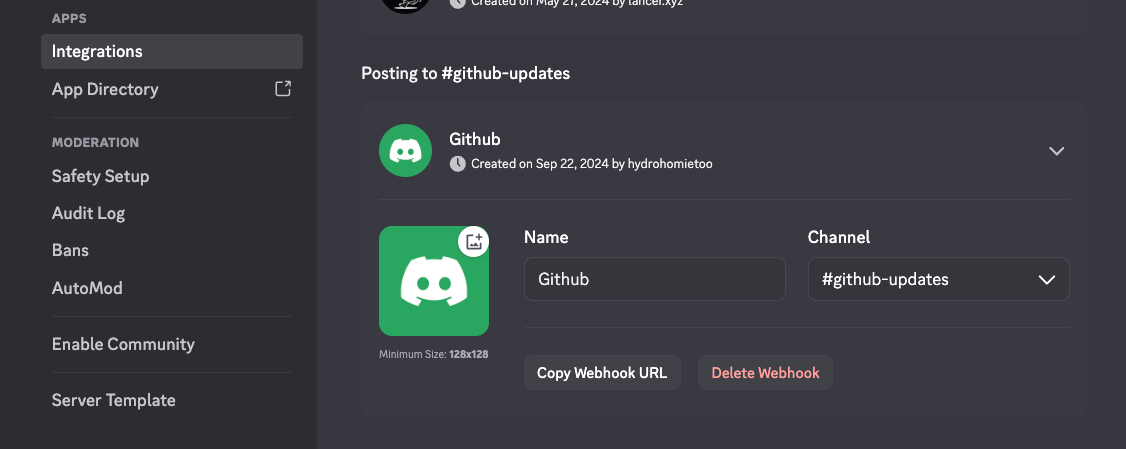
# Step 1: Create a Discord Webhook
A webhook is just a URL that allows external services to send messages into Discord.
# Navigate to Webhook Settings
Go to your Discord server:
Server Settings → Integrations → Webhooks
Click:
New Webhook
# Configure the Webhook
- Give it a name (e.g.,
github-notifications) - Select the channel where messages will be posted
Then click:
Copy Webhook URL
You’ll use this in GitHub.
# Step 2: Add Webhook to GitHub
Now we connect GitHub to Discord.
# Navigate to Repository Webhooks
In your GitHub repository:
Settings → Webhooks → Add webhook
# Configure the Webhook
# Payload URL
Paste the Discord webhook URL and append /github at the end:
https://discord.com/api/webhooks/XXXX/github
Important:
If you don’t add/github, the integration will not work.
# Content Type
Set:
application/json
# Events
Choose what triggers notifications:
- Just select:
Send me everything
(You can filter this later if it gets too noisy.)
# Save the Webhook
Click:
Add webhook
# Step 3: Test the Webhook
Now let’s verify everything works.
# Create a Test Event
The easiest way to test the webhook is by giving the repo a star or forking
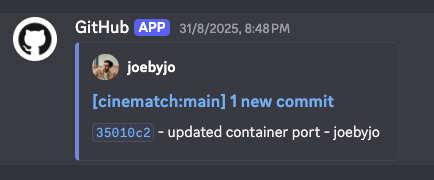
# Expected Result
You should instantly see a message in your Discord channel.
# What Events Will You See?
Depending on your settings, Discord will receive notifications for:
- Pushes (commits)
- Pull requests
- Issues
- Comments
- Releases
Basically, any repository activity.
# One Could Argue…
“Why not use a GitHub bot or integration instead?”
That’s fair. But I intentionally avoided that because:
- This requires zero external services
- It’s completely transparent (just HTTP requests)
- No setup beyond a URL
- No maintenance
Sometimes the simplest solution is the best one.
# Common Mistakes
# Missing /github in URL
https://discord.com/api/webhooks/XXXX
This will NOT work.
# Correct Format
https://discord.com/api/webhooks/XXXX/github
# Wrong Content Type
Make sure it is:
application/json
# Where This Fits in My Workflow
This setup now sits alongside my:
- GitHub projects
- CI/CD pipelines
- Blog deployments
Instead of checking GitHub or email, everything comes to Discord in real-time.
# Final Thoughts
This is one of those setups that:
- Takes 5 minutes
- Requires no code
- Improves your workflow immediately
Push → GitHub event → Discord notification
Done.
If you’re building projects or collaborating with others, this is a super lightweight way to stay updated without constantly checking GitHub.
And honestly once you set it up, you’ll wonder why you didn’t do it earlier.